Department Portal

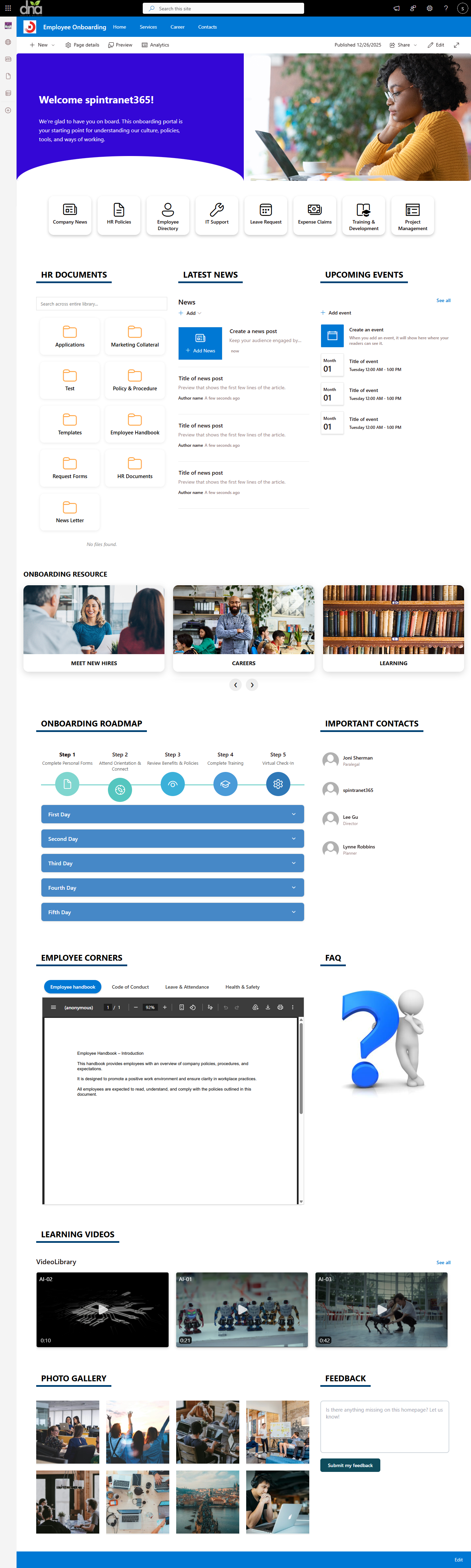
Our modern SharePoint Department Intranet Portal is a centralized digital workplace designed to improve communication, collaboration, and productivity. It connects employees, streamlines processes, and provides secure access to information across the organization.
Technologies Used
- Platform: SharePoint Online (Modern Experience)
- Framework: SharePoint Framework (SPFx)
- Languages: TypeScript, JavaScript, HTML5, SCSS
- UI Library: React + Fluent UI
- Data Access: PnPjs for secure & optimized SharePoint communication
- Deployment: App Catalog (Tenant or Site Collection)
- Design System: Responsive, mobile-first layout
- Branding Support: Custom themes, colors, and layouts
- Performance: Lightweight bundles, optimized loading
- Compatibility: Microsoft 365 & SharePoint Online
One platform. 15 + powerful web parts. Endless intranet possibilities
- SharePoint Banner: Display a clean and impactful hero banner personalized for the current logged-in user. Show a single, high-quality banner image with support for branding, contextual messaging, and user-specific information from SharePoint. Ideal for welcome messages, department highlights, or key communications while keeping the page visually consistent and performance-friendly.
- Announcement: Highlight important updates and alerts.
- Quick Links: Enable fast and easy access to frequently used resources. Organize links using modern icons, categories, and customizable layouts that adapt to your intranet design. Perfect for guiding users to tools, documents, portals, and external systems while improving navigation efficiency and overall user experience.
- SharePoint News: Showcase company news in a modern, configurable layout that highlights announcements, stories, and updates. Designed to keep employees informed and engaged with visually appealing news cards and flexible display options.
- SharePoint Events: Publish company events and training schedules. Includes calendar view and registration options.
- Employee Corner: A personalized hub designed for employees to access essential information in one place. Provides visibility into important updates, assigned tasks, and quick access to frequently used resources, helping employees stay informed, organized, and productive throughout their workday.
- Employee Feedback: Collect feedback through quick forms. Helps measure employee satisfaction.
- SharePoint Video library: This webpart will display video from library.
- SharePoint Picture library: This webpart is showing photos from library.
- SharePoint FAQ: Display faq in a structured, searchable format. Supports categories and filters.
- SharePoint Library Search: Search documents with filters and sorting. Helps users find files quickly.
- SharePoint Top Navigation: Add mega-menu or modern top navigation. Helps users explore intranet efficiently.
- SharePoint Footer Webpart: Add a global, branded footer to all pages. Supports links, social icons, and contact info.
Pricing Plans
✨ Lifetime Access for only $599 — pay once, use forever.
No subscriptions, no renewals.
Install on unlimited site collections within the same tenant for a single purchase.
Contact Us
How to Install
Step 1
Contact us at info@spintranet365.com to receive the latest package.
Step 2
We help you upload and deploy the package to your App Catalog.
Step 3
We assist in configuring the app on your SharePoint page.