Employee Feedback Webpart

The Employee Feedback Web Part allows employees to share their thoughts, suggestions, and experiences directly within your SharePoint intranet. Built with SPFx and React, it provides a clean, user-friendly interface to collect, display, and manage feedback efficiently.
Overview
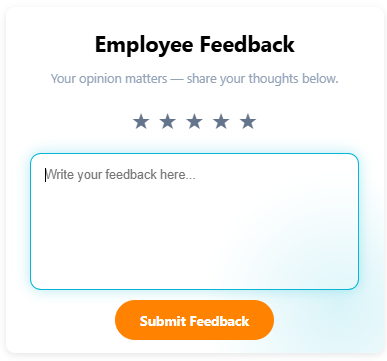
The Employee Feedback Web Part is a modern SharePoint Framework (SPFx) solution that enables organizations to collect, manage, and display employee feedback directly within SharePoint Online. Designed with user experience in mind, it provides a simple yet powerful interface for employees to share their opinions, suggestions, and experiences—fostering transparency and continuous improvement within the organization.
This web part allows employees to submit their feedback with a rating and optional comments. Feedback is stored securely in a SharePoint list, and administrators or HR teams can review submissions for insights and action. It is an excellent tool for promoting open communication and employee engagement in a structured and digital format.
- Easy Feedback Submission: Employees can quickly share feedback using a clean and intuitive form.
- Secure Data Storage: All feedback is stored in a SharePoint list, ensuring compliance and easy access.
- Custom Rating System: Includes a built-in star rating or emoji-based rating system for quick evaluations.
- Dynamic Display: Option to showcase recent feedback or top-rated experiences in a visual layout.
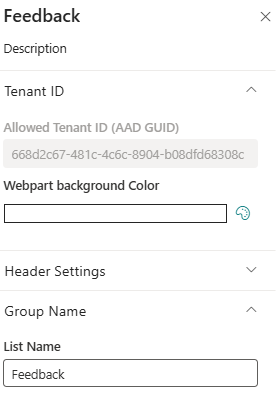
- Fully Customizable: Supports branding, themes, and configurable list connections via property pane.
- Optimized Performance: Built using SPFx and PnPjs for seamless integration and fast load times.
Ideal for HR, management, or internal communications teams, the Employee Feedback Web Part empowers organizations to listen actively, identify improvement areas, and celebrate positive experiences—building a culture of openness and continuous growth.
Product Details
- Platform: SharePoint Online (Modern Experience)
- Framework: SharePoint Framework (SPFx)
- Data Source: SharePoint List
- Integration: Utilizes PnPjs for efficient list operations and form submissions
- Layout: Clean, responsive feedback form with modern UI elements
- Customization: Supports configurable fields, rating scales, and organizational branding
- Performance: Optimized for fast submission, data validation, and rendering
- Feedback Management: Allows administrators to review and analyze feedback easily
- Support: Simple to set up, maintain, and integrate within existing SharePoint intranet solutions
Pricing Plans
How to Install
Step 1
Contact us at info@spintranet365.com to receive the latest app package file.
Step 2
We will assist you remotely to upload and deploy the package to your SharePoint App Catalog site.
Step 3
Once deployed, we’ll help you install and configure the app on your SharePoint page for seamless integration.