Employee Birthday

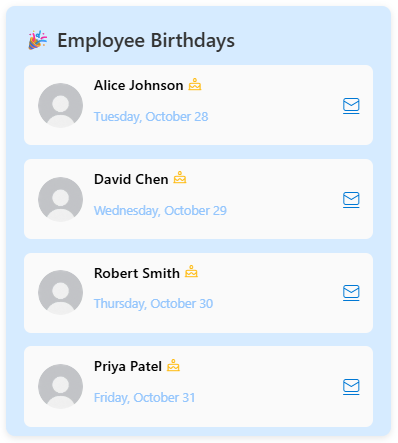
The Employee Birthday Web Part displays upcoming staff birthdays in an engaging and visually appealing format. It highlights employee names, photos, and birth dates, helping teams celebrate special occasions and strengthen workplace connections. Perfect for adding a personal touch to your SharePoint intranet homepage.
Overview
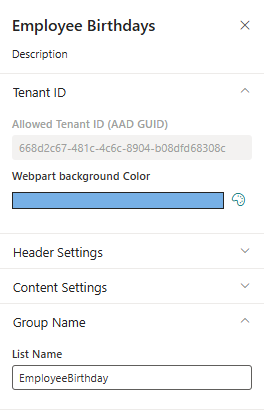
The Employee Birthday Web Part is a modern SharePoint Framework (SPFx) component that dynamically displays employee birthday information pulled directly from a SharePoint list. It provides an engaging and interactive way to recognize and celebrate team members’ birthdays across your organization.
This web part automatically retrieves data such as employee name, photo, department, job title, and date of birth from a configured SharePoint list and presents it in an attractive, responsive layout. Users can easily view upcoming birthdays for the current day, week, or month, helping to foster a culture of appreciation and connection within the workplace.
- Automated Data Integration: Seamlessly connects to a SharePoint list containing employee birthday details.
- Attractive, Responsive UI: Displays employee photos, names, and job titles beautifully across devices.
- Configurable Display Options: Supports filtering for today’s, weekly, or monthly birthdays.
- Lightweight & Optimized: Uses SPFx best practices with efficient data retrieval via PnPjs or REST API.
- Customizable Design: Allows full branding alignment with your organization’s color theme and layout preferences.
This web part is an ideal addition to your SharePoint intranet or HR site, helping teams stay connected and celebrate special moments together in a meaningful way.
Product Details
- Platform: SharePoint Online (Modern Experience)
- Framework: SharePoint Framework (SPFx)
- Data Source: SharePoint List
- Integration: Uses PnPjs for efficient data retrieval and rendering
- Layout: Fully responsive grid with modern styling and animations
- Customization: Supports color themes, display formats, and configurable filters
- Performance: Optimized for minimal load time and smooth rendering
- Support: Easy maintenance, extensible code structure, and reliable performance
Pricing Plans
How to Install
Step 1
Contact us at info@spintranet365.com to receive the latest app package file.
Step 2
We will assist you remotely to upload and deploy the package to your SharePoint App Catalog site.
Step 3
Once deployed, we’ll help you install and configure the app on your SharePoint page for seamless integration.